
 English US
 English UK
 English AU
 English SG
 Français
 Deutsch
 Italiano
 Español
 Nederlands
UPDATES BEST PRACTICES
Understanding our philosophy for updates management with Esker Update Plan

Understanding Esker's environment structure
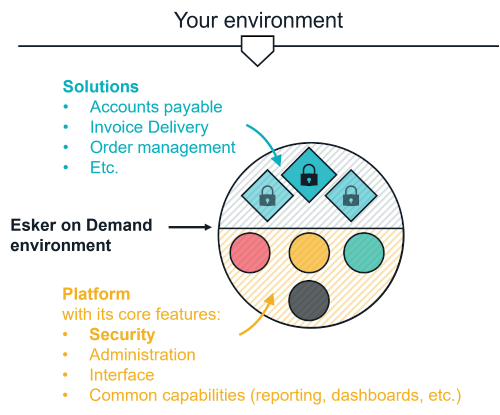
Esker on Demand is a SAAS environment, comprised of a standard software platform on which your solutions are hosted.
The standard platform is the core of the environment and includes all the features that are shared with every user of the platform. These features are typically:
Each Solution, on the other hand, is a default – or standard application, on top of which lies all the configuration and the customization made to have it fit exactly into your business workflow, making it unique on our platform. It’s 100% your application and is not shared with any other user. The default application version on which your solution is based is the version of your custom application. Typical applications can be:
|  |
Automatic updates vs planned updates
Ensure Security and Consistency, at all time
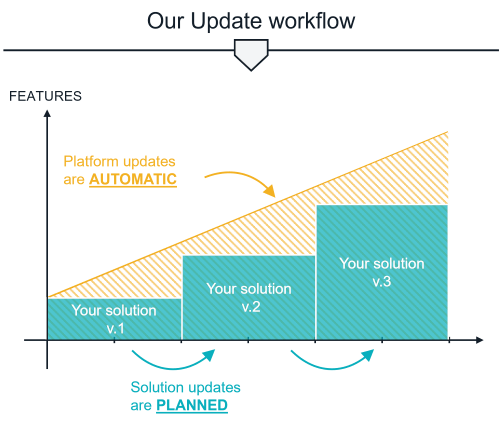 | Regarding updates, there is an important difference between the two parts of your environment:
|
The perfect mix for the best experience
AUTOMATIC PLATFORM UPDATE | & | PLANNED SOLUTIONS UPDATE | |
Updates of core components, such as:
| Updates of your tailored applications:
| ||
▼ MAIN CHARACTERISTICS ▼ | |||
|
| ||
▼ BENEFITS ▼ | |||
|
| ||
By mixing these two types of updates, you benefit from a secured environment at any time, and from globally available features, while ensuring no disruption in your daily use of the solution as well as a consistent business workflow.
Esker’s updates management best practices
We’ve established that solutions updates are not automatic, but this doesn’t mean you shouldn’t update the solution. You definitely should, but on a longer period between two updates.
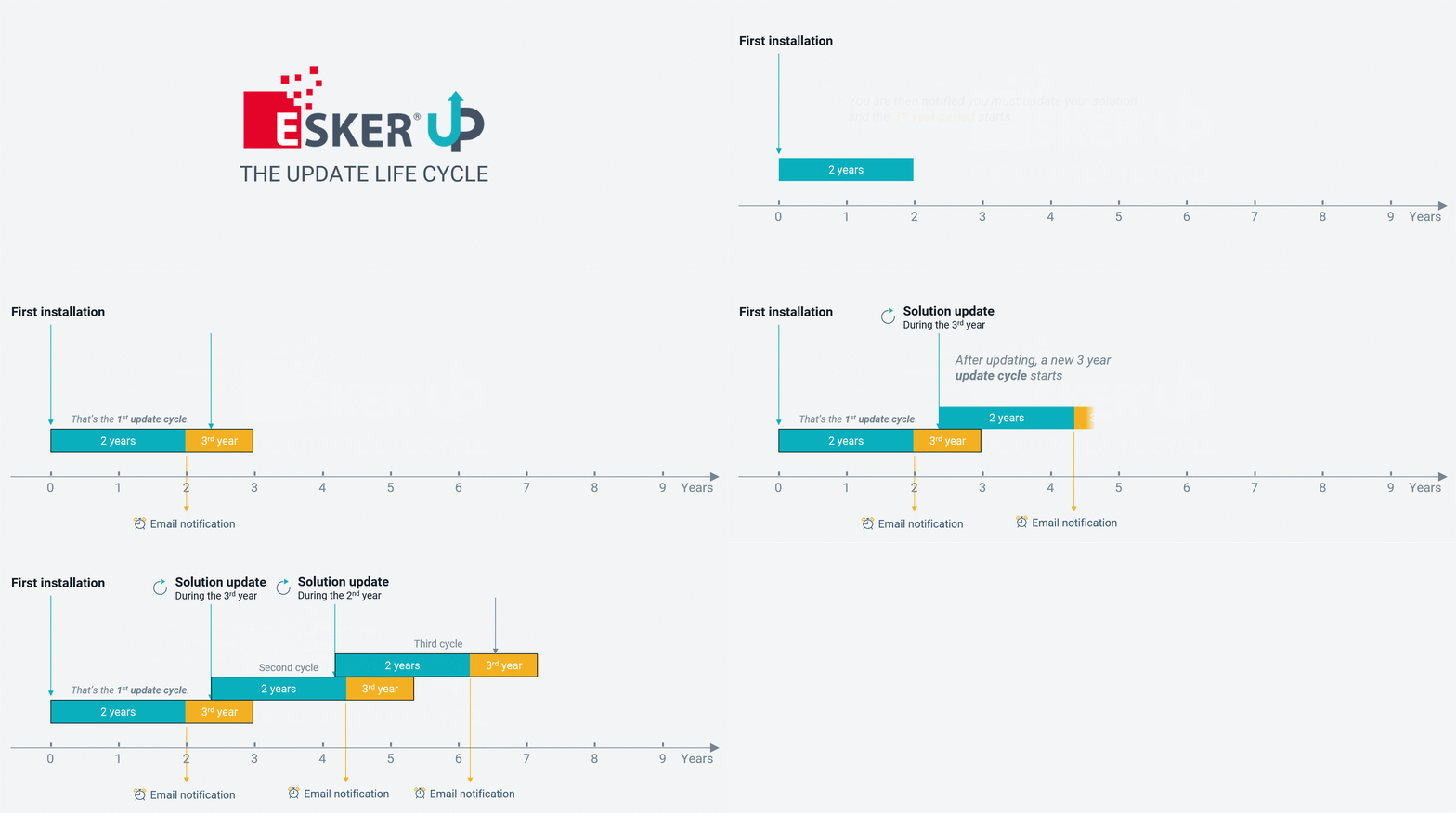
Esker’s recommendation is to update your solutions every two years.
Update timeline
While we recommend a 2-year period, we know that your involvement in the update process can make it difficult to perfectly time those, and there is of course some flexibility. You are of course welcome to update your solution at any time before the 2 years period, and you may wait up to a maximum of 3 years before the next update.
Two years after your last update, you will receive an email, informing you that you should plan for an update of your solution with Esker. Other reminders will then be sent to you during the third year period.
Below is a typical update timeline:
Why should I update if everything is working as expected?
Of course, if the platform is automatically updated with security patches, and your solution workflow provides you with the experience you need today in your daily business, it’s a legitimate question to wonder why you should update the solution. Well, they are many benefits to do so, we've listed just a few below:
Stay informed and keep an eye on new opportunities
- It’s a great time to reassess your needs: Did your business evolve during that time, did the internal processes changed? Are there things that could be improved or adjusted to match those changes?
- Take a look at new features: Since you last update, new features have been released in later versions. Maybe some of these would be nice additions to your solution process?
- Explore complementary solutions: Esker regularly releases new solutions, that can be integrated into your environment as a complimentary solution to your existing one and expend your implementation capabilities.
Reduce pain and reduce costs
- Running a recent version of an application eases support and accelerate solving support issues..
- Increased updates frequency means smaller update projects, faster deployment, and therefore lower costs. Especially when update charge grows exponentially with time. For example:
- Updating a 4-years old solution requires more work than twice a 2-years old solution update. The older a solution gets, the more important is the preparation work needed to fit your customization in the up-to-date framework.
Be prepared for unplanned changes
- You company’s growth will probably induce an evolution of your internal business processes.
- The world is changing, and new regulations and mandates are voted every year.
- So, even though updating your solution can be a pure maintenance update if you don’t have the need for any of the new features, having them ready will turn out to be a real time-saver when it becomes required.